Tool to tool integrations
Your CRM, inbox, forms, spreadsheets, accounting, calendar, storage, and chat connected so data moves once, automatically, without anyone retyping it.
Automation Workflows
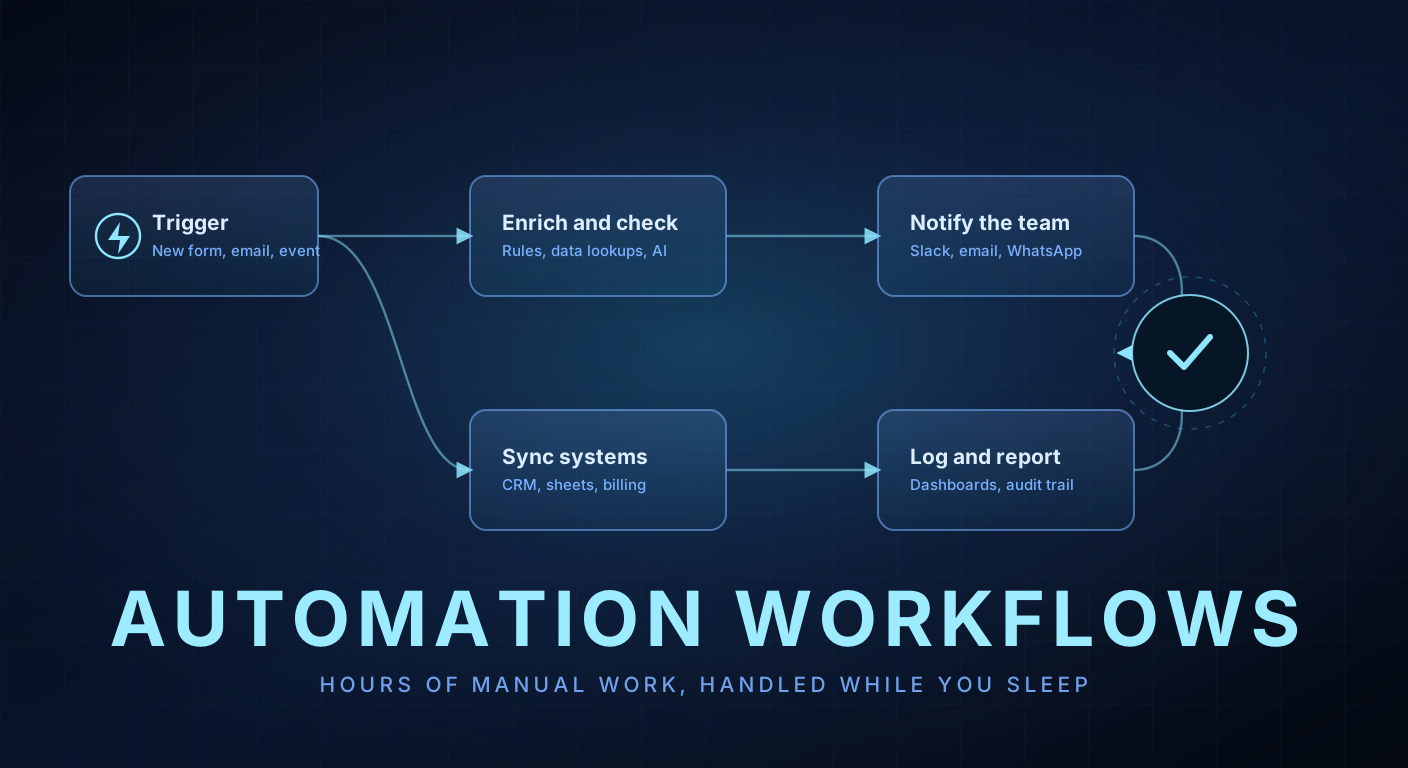
We connect the tools you already use and automate the handoffs between them. Forms, invoices, onboarding, reporting, reminders, data entry, and everything else your team copies from one screen into another all day. Set up once, running quietly forever.
Why It Matters
Count the small tasks that happen every day. A form comes in, someone retypes it into the CRM. An invoice arrives, someone files it and updates a sheet. A client signs, someone sends the same four emails and creates the same folders. Each takes minutes and together they eat entire salaries.
Automation removes the handoffs rather than the people. The form fills the CRM, the invoice files itself, the onboarding sequence fires the moment the contract is signed, and your team spends its day on the work that actually needs a human brain attached.
We are not tied to one platform. Sometimes the right answer is n8n or Make wired up in an afternoon. Sometimes it is a small custom service because the tools cannot do what you need reliably. We pick based on what will still be running in a year, not what is quickest to demo.
Capabilities
If it happens more than a few times a week and follows rules, it is a candidate.
Your CRM, inbox, forms, spreadsheets, accounting, calendar, storage, and chat connected so data moves once, automatically, without anyone retyping it.
New enquiries captured, enriched, scored, routed, and answered, then contracts, folders, invoices, and welcome sequences created the moment a deal closes.
Invoices, receipts, purchase orders, and forms read automatically, checked against your rules, filed correctly, and pushed into your accounting system.
Numbers pulled from every system on a schedule, assembled into the report your team used to build by hand, and delivered to Slack, email, or WhatsApp with the anomalies flagged.
When off the shelf tools hit their limit, we write a small, reliable service instead, with proper logging and retries, so the workflow does not break under real volume.
Every workflow reports its own health. If a third party API changes or a run fails, you hear about it from an alert rather than from an angry customer.
How We Work
No six month discovery phase. We move in short cycles and you see working software early.
We shadow the work for a short window and write down what really happens, including the undocumented steps and the exceptions everyone handles from memory.
Each candidate workflow gets an estimate of hours saved against effort to build. We start at the top of that list so the project pays for itself early.
We build the workflows, wire up the accounts and permissions properly, and handle the edge cases rather than pretending the happy path is the only path.
For the first week the automation runs alongside the manual process so you can compare outputs and trust it before you switch the old way off.
Documentation, a walkthrough with your team, alerting on failures, and a monthly check that everything is still healthy as your tools update around it.
Tools we build with
Describe one process that eats hours. We will come back with what it takes to automate it, how many hours it saves, and what it costs to build.
We reply within 24 hours with a clear plan, a timeline, and a number.
Use Cases
Patterns we have shipped before, so we already know where the traps are.
Enquiries logged, deduplicated, assigned, and followed up automatically, so nothing sits in an inbox and your CRM stops being a graveyard of half filled records.
Invoices raised, chased, matched to payments, and reconciled, with a clear exception list for the handful of cases a person genuinely needs to look at.
Accounts, permissions, equipment requests, paperwork, and training schedules triggered from one form instead of a checklist somebody keeps forgetting.
Customers kept informed automatically at every step, which quietly removes the most common reason people call your support line at all.
One approved piece distributed across channels on schedule, with the tracking, tagging, and reporting handled without anybody logging into five platforms.
Two systems that should agree and never do, kept in step continuously, with conflicts surfaced rather than silently overwritten.
What You Get
You finish the engagement owning the system, the code, and the knowledge to run it without us. That is the point.
FAQ
The questions every serious buyer asks us before the first invoice.
Whichever survives contact with your process. We build most work in n8n, use Make or Zapier when they fit, and write custom code when the tools cannot do the job reliably. You are not pushed onto a platform because it suits us.
Almost never. The point is to connect what you have. We only recommend replacing a tool when it genuinely has no way to integrate and it is blocking the whole workflow.
Every workflow has retries and failure alerts, so you find out immediately and nothing disappears silently. Failed runs queue for review rather than vanishing, and we can hold a support retainer for fast fixes.
A first set of workflows usually goes live in two to three weeks, and the hours saved show up immediately. We measure it, so you can see the return rather than take our word for it.
Automations run on your own accounts with scoped permissions, sensitive fields stay out of logs, and self hosted n8n is available when data must not touch a third party service.
Yes, and often it should. Classifying messages, extracting fields from documents, or drafting replies are natural AI steps inside an otherwise rule based workflow. We use it where it beats a rule and skip it where it does not.
Keep Exploring
Most projects touch more than one of these. We can take the whole thing or slot into the part you need.
Tell us the problem in plain language. We will tell you whether it is worth building, what it takes, and what it costs, before you spend a rupee or a dollar.
We reply within 24 hours with a clear plan, a timeline, and a number.